Secure Password Manager Program for Mobile Phones
Secretcodes is a Freeware mobile software used to store your important passwords/codes to your mobile phone. it encrypt them and password protect your data. you may use it to save your credit/debit card, email, computer or any other codes that you may forget. without a worry.
SecretCodes stores encrypted databases that may be used for a single topic. Every database is made by a set of records. Every record is made by a key and a set of values. It is possible to backup and restore those records to/from a PC.
This program is given WITHOUT any warranty.
Usage Instructions:
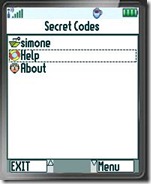
- The initial screen shows all the available databases plus help and about options.
- Select a database to open it.
- HELP to show this help.
- ABOUT to read author and version details.
- To open a database it is also required a password because they are encrypted.
- Use EXIT button to exit the program
- Use NEW button to create a new database providing its name and password (the password has to be inserted twice for confirmation, do not insert anything to avoid encryption). After a database is opened or created the list of records is showed.
- Use ADD button to add records, use DELETE DB button to delete the entire database.
- Use SAVE&CLOSE button to save and close the database.
- Use OPTIONS to choose among several visualization (key, value, key and first value, key and all values, firs value and key, all values and key) and order options (order by key, first value, sort order and case sensitiveness).
- Use SYNC to backup or restore the current database in a PC or in another phone running SecretCodes: all the available connections will showed (USB cable and IrDA are defaults), if the phone supports JSR82 it is also possible to use Bluetooth.
- The backup file in encrypted, to restore it a new database with the same password has to be created.
- Use PASSWORD to change the current password (the password has to be insert twice for confirmation, do not insert anything to avoid encryption).
- Select a record to edit its key and values.
- Use DEL RECORD to delete the record.
- use ADD NEW VALUE to add a new value field, use DEL LAST VALUE to delete last value field.
- Use GEN PASSWORD to generate a random password for a value field. GEN PASSWORD shows a new screen: select in which value will be inserted the password, the password length, if it has to include lower case chars, upper case chars, numbers, symbols or if it has to follow a template where every place is of a given type. Use GEN PASSWORD to make a new password (which can be edited), use OK to write it in the value field and CANCEL to go back.
Its compatible with almost all Mobiles that supports Java (J2ME). All modern mobiles supports J2ME.
You may download Secret Codes for mobile Phones and get more Info From its
Official Website
Secret Codes 1.9.1-Password Manager for Mobile Phones
Read More...


